Analytics cookies

We use Google Analytics to understand which pages are useful and how visitors find us. We only load it if you accept.

Belscar

Shadow Systems

Find the hidden systems creating risk and unreliable decisions.

Belscar helps owners and leadership teams identify the spreadsheets, side tools, manual bridges, and undocumented workflows that now quietly run important parts of the business.
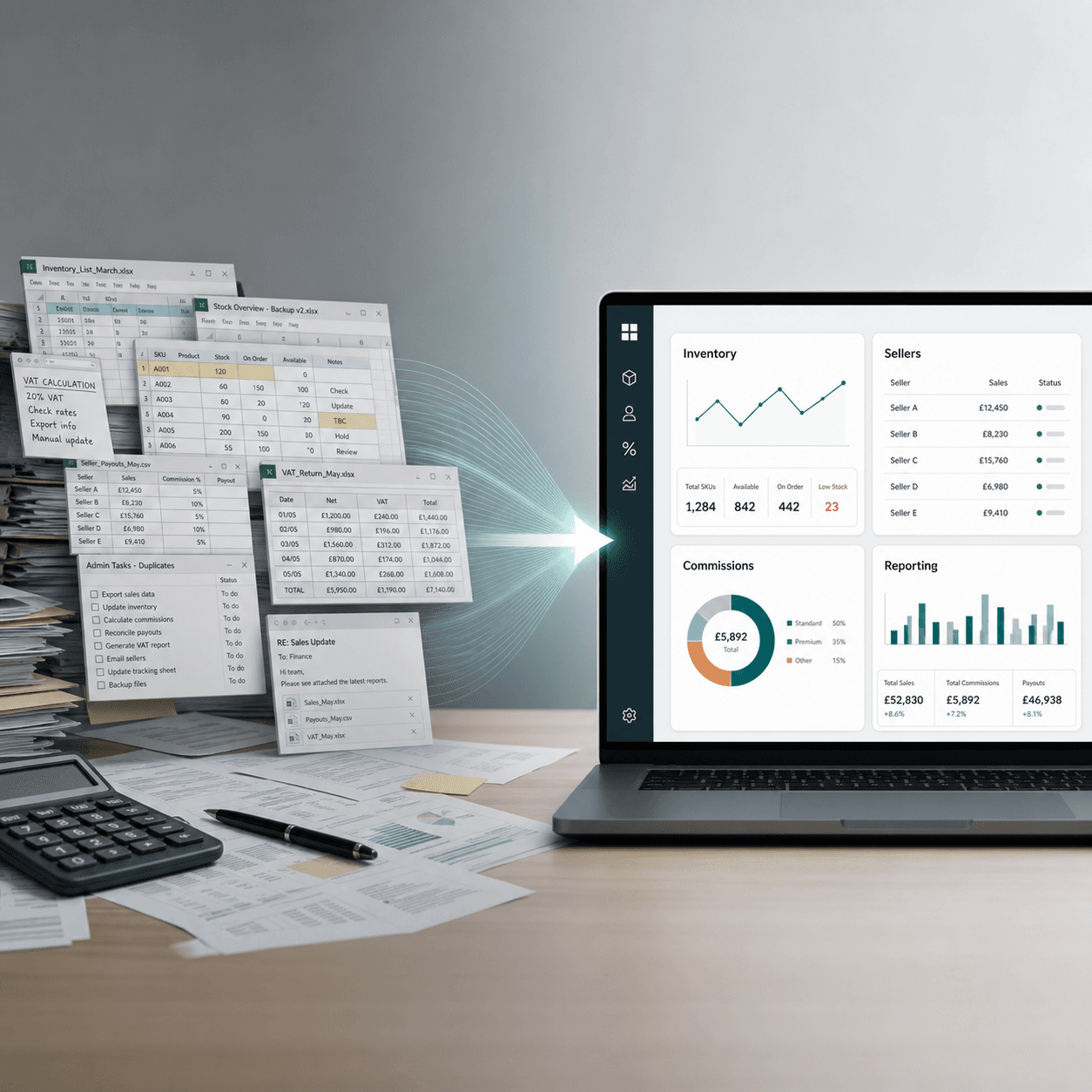
Manual spreadsheets and hidden operational work becoming one trusted operating view.

Where it shows up

The workaround may be practical. The risk appears when it becomes infrastructure.

Critical spreadsheets

Important processes run in files that were never designed to be operational infrastructure.

Hidden workflows

The real process happens between systems, inboxes, exports, shared folders, and team memory.

Key-person dependency

One or two people know how the workaround works, what to check, and what breaks if it changes.

Unreliable reporting

Leadership waits for manual reconciliation before anyone is comfortable trusting the numbers.

Signs to look for

The problem is usually visible before it becomes urgent.

Teams usually create shadow systems for sensible reasons. They become a leadership issue when nobody can see, control, repeat, or safely hand over the process.

Stock, margin, orders, commissions, scheduling, or client reporting live outside the main systems.

Teams maintain the same information in more than one place.

A process stops or slows down when a specific person is unavailable.

Audit, compliance, or leadership has started asking who owns the file, logic, or workflow.

Before and after

Replace fragile workarounds with controlled operating views.

The goal is not to shame the spreadsheet. It is to move important work into a controlled workflow with clear ownership, dependable reporting, and fewer hidden points of failure.

Spreadsheet runs the process

Controlled workflow

One person knows the logic

Clear ownership

Reports rebuilt manually

Dependable reporting

No audit trail

Appropriate access and history

More tools add confusion

One clearer operating layer

How we work

Map the workflow, then replace the risky part.

01

Map

Understand how the work really moves, including the exceptions, handoffs, files, and informal checks.

02

Assess

Identify where risk, wasted time, broken visibility, key-person dependency, or weak control is sitting.

03

Replace

Build a practical system or controlled workflow that fits the process and gives leadership a trusted view.

04

Embed

Move the team onto the new way of working with clear ownership, documentation, and adoption support.

Where AI fits

AI cannot rescue a workflow nobody can trust.

Once the workflow, ownership, and reporting layer are controlled, AI can help with summaries, exception flags, and preparation work. Before that, it often makes unclear information move faster.

See how Belscar applies Business AI

FAQ

Common questions

How do I know if we have hidden operational risk?
Common signs: a critical process only works if one person is available; leadership cannot get a dependable operational picture without someone pulling numbers together; the same data is maintained in more than one place; reporting takes days of manual reconciliation; or everyone knows the spreadsheet is fragile but nobody wants to touch it. If growth has made the workaround load-bearing, the risk is already real.
Why does this matter before adding more tools or AI?
If the business is running on shadow spreadsheets, manual reconciliations, and undocumented decisions, more tools usually add another layer of confusion. Belscar fixes the operational layer first: who owns the work, where the data lives, how the process is controlled, and which numbers leadership can trust. AI can then be used as complementary technology where it drives real benefit, such as clearer summaries, exception handling, or faster understanding.
Why do spreadsheets become operational infrastructure?
Because they are fast. A team hits a gap—between systems, between departments, or between what the business needs today and what IT can prioritise—and Excel or Google Sheets is the quickest way to keep working. The file works, gets embedded in the process, and eventually runs something important. The problem is not the spreadsheet itself; it is that the business has no practical path to a controlled system.
What are shadow systems and shadow IT?
Shadow systems are operational workflows running outside your proper systems: spreadsheets, Access databases, unapproved tools, shared drives, and manual bridges between apps. Shadow IT is the wider label for technology used without visibility or control. Teams are usually being practical, not reckless—but the business loses version control, access control, and a single source of truth.
How is this different from your Company OS offer?
This page is about recognising operational risk: unmanaged processes, spreadsheet dependency, disconnected workflows, and fragility as you scale. Company OS is where we build the broader operating system for the business—inventory, customers, margin, reporting, joined-up workflows, and practical AI support. Many engagements start here when one critical process is the immediate risk; others move straight to Company OS when the whole operating model needs one dependable system.
What is EUC (end-user computing)?
EUC is the formal term used in audit and regulated environments for tools built and run by business teams—especially spreadsheets and databases that sit outside IT governance. If you are in financial services or under formal audit scrutiny, EUC programmes, shadow IT, and spreadsheet governance are often how risk teams describe the same underlying problem.
Do you work with regulated or audit-sensitive environments?
Yes. We have delivered in contexts where audit trails, access control, and remediation timelines matter—including financial services and other regulated sectors. We map the process, document where control is missing, and build a purpose-fit replacement with the controls your risk and compliance teams need—not a generic platform forced to fit.
How quickly can you replace a critical spreadsheet or workflow?
A working, testable application is typically delivered within 2–3 weeks of design sign-off. The full engagement usually runs 4–6 weeks depending on complexity and how many teams need to be involved in sign-off.